The client
Interview practice that should feel like the real thing
An online assessment-preparation platform that helps candidates practise for hiring tests and interviews. Its users come to rehearse the moments that decide a job offer, and the closer the rehearsal is to the real thing, the more it is worth.
The next step was an AI interviewer with a face — one that listens, answers and reacts in real time.
The challenge
A shortlist of avatars and no way to choose between them
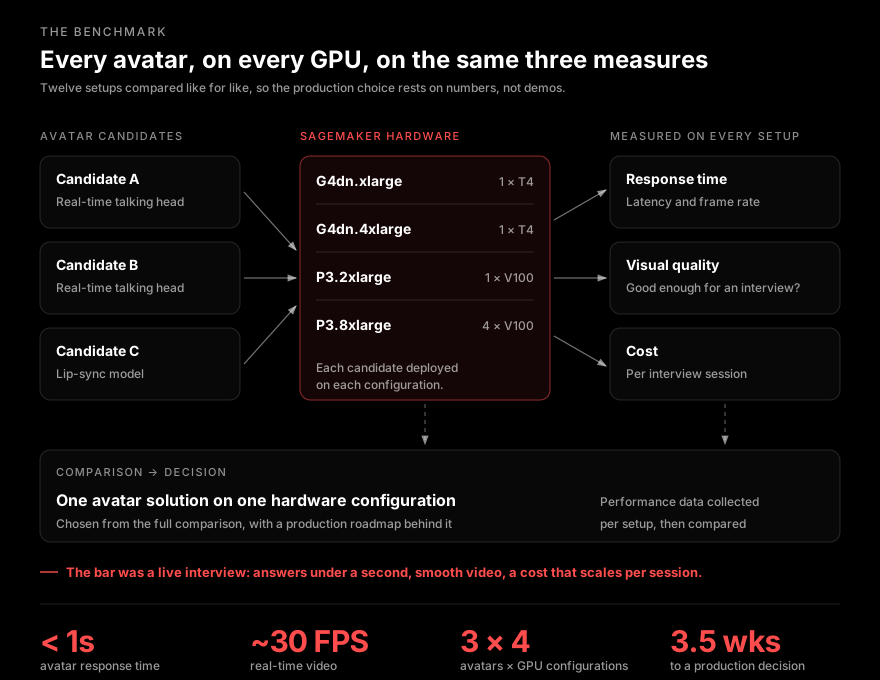
Every real-time avatar looks good in its own demo. None of those demos say how fast it answers, how it looks or what it costs on the hardware the platform would actually run.
The bar for a live interview
Picking wrong is expensive. An avatar that lags breaks the interview, and one that needs the biggest GPU for every session breaks the unit economics.
Constraints
What we had to design around
- LatencyA candidate asks a question and waits. Past a second, the pause stops feeling like an interviewer thinking and starts feeling like software loading. Response time had to stay under one second, with video near 30 frames per second.
- PresenceInterview practice only works if it feels like an interview. The avatar had to look professional on camera — no smeared lips, no frozen frames, no uncanny drift mid-answer.
- Unit costThe avatar runs for every practice session, not once. The number that mattered was cost per interview session, and it had to hold up at the platform’s volume.
- Own infrastructureVendor demos run on vendor hardware. The answer had to come from the platform’s own cloud, on GPU instances it could actually provision.
- A decision, not a surveyA long comparison table does not ship a product. The work had to end in one solution, one hardware configuration and a roadmap to production.
Our approach
Measure every pairing, then decide once
The question was never which avatar is best. It was which avatar on which hardware. A model that is too slow on a T4 can be excellent on a V100 — at a very different cost per session.
So we treated it as a matrix. Every candidate ran on every GPU configuration, and every setup was scored on the same three measures: response time, visual quality and cost per interview session. The recommendation then falls out of the comparison instead of out of an opinion.
The solution
Five steps, from shortlist to production choice
- Candidate shortlist — Three real-time avatar technologies, pre-selected from a wider market scan of commercial and open-source options on real-time performance, customisation and how they integrate.
- Deployment on SageMaker — Each candidate packaged and deployed as an inference endpoint on Amazon SageMaker, so all three ran on the same managed infrastructure.
- Hardware matrix — Every candidate run on four GPU configurations — G4dn.xlarge and G4dn.4xlarge on a single T4, P3.2xlarge on a single V100, and P3.8xlarge on four V100s — from the cheapest viable instance to the most powerful.
- Measurement — Response time and frame rate, visual quality assessed against an interview-grade bar, and cost worked out per interview session. The same three measures for every setup.
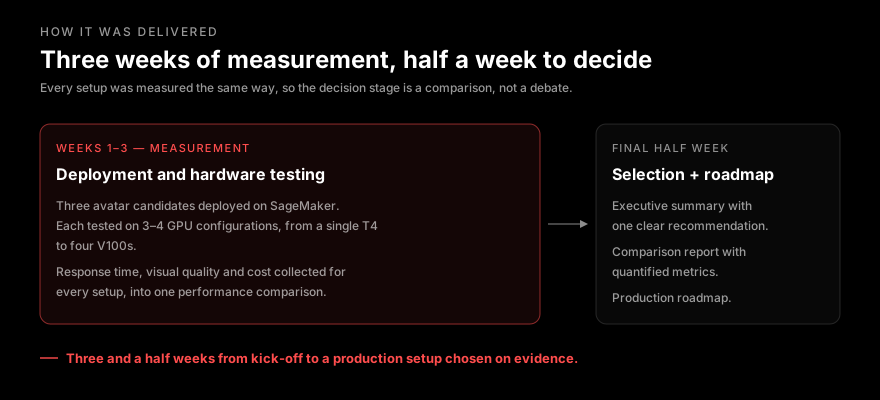
- Comparison and decision — Performance data collected per setup and compared side by side. The output: an executive summary with one recommendation, the detailed comparison report and a production implementation roadmap.
Responsible by design
Four rules for a benchmark you can act on
Like for like
Every setup measured the same way.
Same measures, same infrastructure, same bar for every candidate on every GPU. A number from one setup can be read against any other.
Real hardware
Measured where it runs in production.
No figures borrowed from vendor benchmarks. Each result comes from the candidate running on an instance the platform can provision itself.
The candidate’s view
Quality judged as a person in an interview sees it.
Visual quality is assessed on what a candidate would notice — lip sync, smoothness, steadiness — not on an abstract model score.
Cost per session
Price the unit the business sells.
GPU hours are converted into cost per interview session, so the recommendation is a business number, not just a technical one.
The first rule shapes the rest. A benchmark is only useful if its numbers can be compared. Change the conditions between setups and the table looks precise while telling you nothing.
Results
What the platform walked away with
- Response in under one second from the recommended setup — fast enough that a practice interview flows like a conversation.
- Real-time video at around 30 frames per second, with professional-grade visuals suited to an interview.
- A known cost per interview session for every setup, so the chosen configuration was picked with its running cost already understood.
- One clear recommendation — a single avatar solution on a single SageMaker hardware configuration, backed by a quantified comparison of every alternative.
- A production roadmap in three and a half weeks, so the build started from evidence rather than from a vendor’s demo.
The team stopped debating demos and started building on a setup it had already seen perform.
Beyond the numbers
What else changes
The benchmark outlives the decision. Real-time avatar models move fast. With the measures and the harness in place, a new candidate or a new GPU generation is one more row in the comparison, not a fresh evaluation.
And because cost is known per session, product and finance can plan the feature’s growth with the same numbers engineering used to choose it.
If you are choosing a real-time AI model on demos alone
The first question is what your users notice first — delay, quality or price. That defines the benchmark, and it can be answered before anything gets built.