The client
Two teams buried in their own documentation
A large enterprise technology company maintains thousands of technical documents — deployment guides, best-practice manuals, product references — spanning multiple product lines.
Two teams depend on them daily: customer support, and field engineering troubleshooting live systems. The second group is the one that made the requirements strict.
The challenge
The answer existed; nobody could reach it
Four problems, all downstream of the same cause. Finding specific information across the library was slow. Teams could not see the connections between related deployment scenarios and configurations — connections that were the actual answer to most questions. Getting precisely relevant information while troubleshooting a complex system was hard, and troubleshooting is when it matters most. And documentation kept evolving across product lines, so staying current was its own job.
The cause: search was keyword matching. That produces information silos by construction. It can only return documents containing the words you typed, so a concept spanning multiple documents is structurally invisible.
Constraints
What we had to design around
- FormatsThe library was PDFs, Word documents, PowerPoints and HTML, with no prospect of normalising it first — and no appetite for a migration project before the useful part.
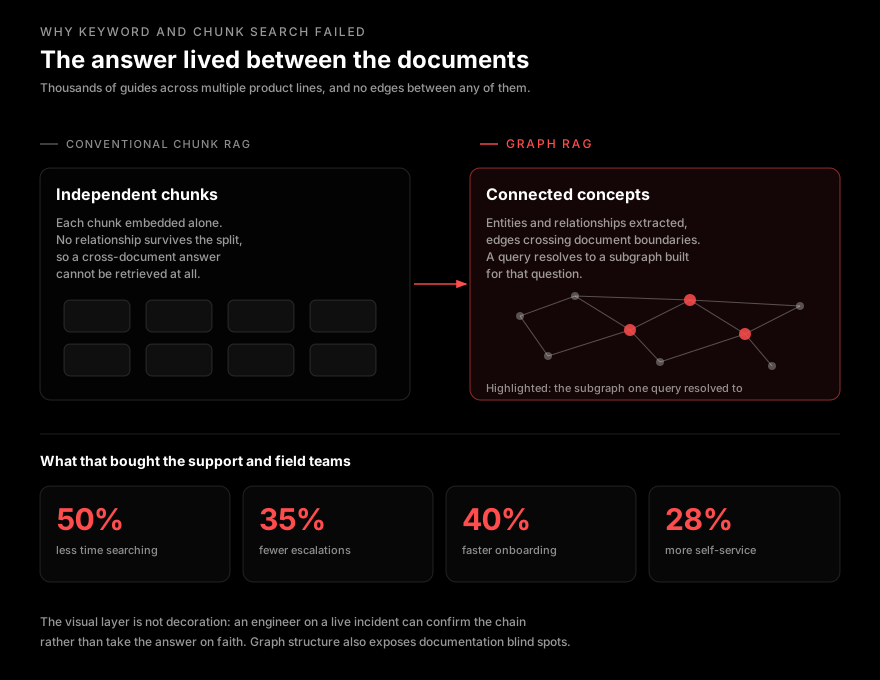
- MeaningThe information that mattered lived between documents. Chunk-and-embed treats each chunk as independent, which loses exactly the thing being searched for.
- TrustField engineers act on these answers under time pressure. An answer they cannot trace is an answer they will not use.
- ChangeDocumentation keeps evolving across product lines, so the graph could not be a one-time build.
Our approach
Preserve the relationships that chunking destroys
Conventional RAG treats documents as disconnected chunks. That is fine when the answer sits inside one chunk, and useless when the answer is the relationship between two.
These teams were overwhelmingly asking the second kind of question — how does this deployment scenario relate to that configuration — so the retrieval layer was built as a knowledge graph, and the relationships survive ingestion.
The solution
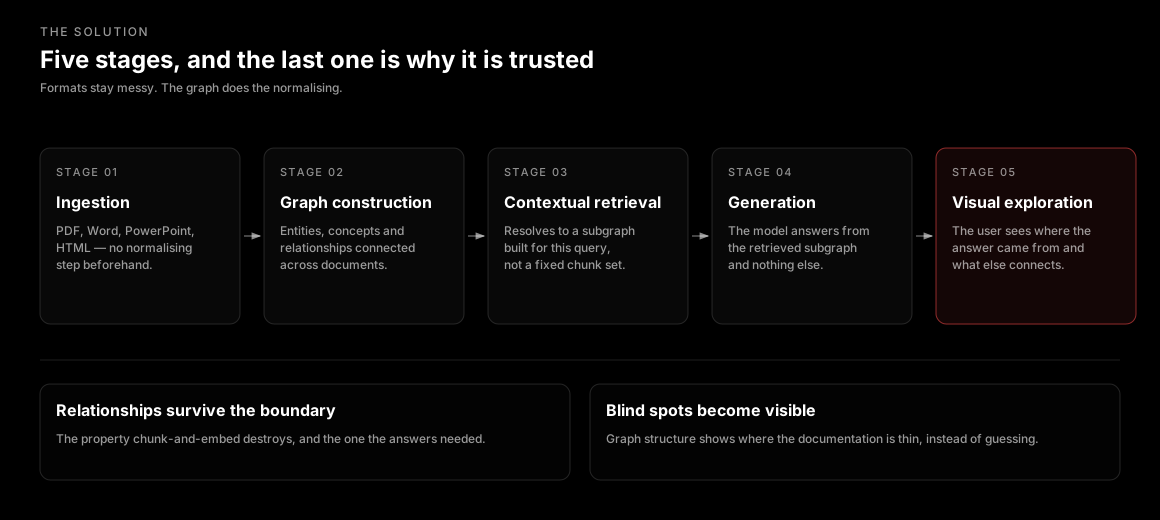
Five stages, and the last one is why it is trusted
- Ingestion — PDFs, Word, PowerPoint and HTML processed as they are, extracting entities, concepts and relationships. No normalisation step beforehand.
- Graph construction — A comprehensive graph database is built, connecting related concepts across document boundaries rather than within them.
- Contextual retrieval — A query resolves to the most relevant subgraph, generated for that question rather than selected from a fixed chunk set.
- Generation — The model answers from the retrieved subgraph and nothing else, drawing connections across the documents that subgraph spans.
- Visual exploration — The user explores the knowledge network directly, seeing where the answer came from and what else connects to it.
Responsible by design
Four properties that make the answer usable
Preserve
Relationships survive the ingestion, because they are the answer.
Chunking destroys the property most of these questions depend on. The graph keeps concepts connected across document boundaries.
Trace
Every answer shows where it came from.
The visual layer is not decoration. An engineer on a live incident confirms the chain rather than taking output on faith.
Adapt
The context is built per query, not selected from a fixed set.
A subgraph generated for one question is a different shape from the subgraph generated for the next.
Admit
Where the documentation is thin, the system says so.
Analysing graph structure identifies documentation blind spots instead of quietly generating over them.
The traceability one is not a compliance feature; it is why the system got adopted. A field engineer working a live incident will not act on an answer they cannot verify, and the cost of verifying a conventional RAG answer is often higher than the cost of just searching manually.
Results
Measured across the documentation portal
- Time spent searching for technical information fell 50%, against the prior keyword-matching search solution.
- Escalated support tickets fell 35%, and customer self-service resolution rose 28% — the same improvement seen from both sides of the support boundary.
- Employee onboarding time dropped 40%, alongside a 42% improvement in knowledge transfer efficiency.
Both sides of the support boundary
Beyond the numbers
What else changed
Five properties separate this from chunk-based RAG — holistic knowledge representation preserving semantic relationships across document boundaries; dynamic context adaptation generating a subgraph per query; explainable AI through visual source tracing; knowledge gap identification from graph structure; and multi-format flexibility with no special document preparation.
The one the client did not ask for and now relies on is the fourth. Analysing the graph shows where the documentation is thin — so the system surfaces what has not been written, rather than confidently generating into the gap.
The improvements above were measured across the client’s technical documentation portal after deployment. They reflect one enterprise corpus; a library with a different shape — flatter, or with fewer cross-references — would see a different profile of gains.
If your documentation search returns documents but not answers
The test is simple: ask it a question whose answer spans two documents. If it cannot, the problem is the representation, not the model.